In this article I will explain with an example, how to read Connection String from
AppSettings.json file in .Net Core 10 and ASP.Net Core 10.
What is IConfiguration
The IConfiguration is an interface for .Net Core 10.
The IConfiguration interface need to be injected as dependency in the Controller and then later used throughout the Controller.
The
IConfiguration interface is used to read Settings and Connection Strings from
AppSettings.json file.
Adding the AppSettings.json file
In order to add AppSettings.json file, right click on the Project in Solution Explorer. Then click Add, then New Item and then choose App Settings File option (shown below) and click Add button.
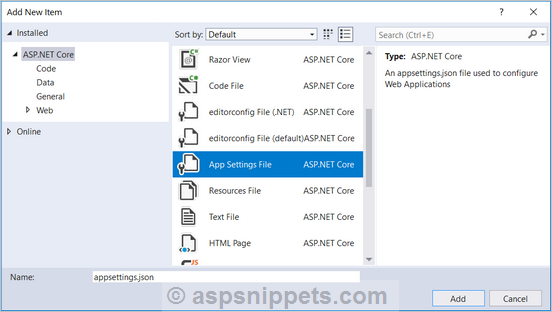
Once the file is created, it will have a DefaultConnection, below that a new Connection String entry is added.
{
"ConnectionStrings": {
"DefaultConnection":"Server=(localdb)\\MSSQLLocalDB;Database=_CHANGE_ME;Trusted_Connection= True;MultipleActiveResultSets=true",
"MyConn":"Data Source=.\\SQL2022;Initial Catalog= AjaxSamples;Integrated Security=true"
}
}
Reading Connection String from AppSettings.json file using IConfiguration interface
In the below example, the IConfiguration is injected in the Controller and assigned to the private property Configuration.
Then inside the Controller, the Connection String is read from the
AppSettings.json file using the
GetSection function of the
Configuration property.
public class HomeController : Controller
{
private IConfiguration Configuration;
public HomeController(IConfiguration _configuration)
{
Configuration = _configuration;
}
public IActionResult Index()
{
string connString = this.Configuration.GetConnectionString("MyConn");
return View();
}
}
Screenshot

Downloads
