The File will be stored in a Folder (Directory) on Server.
Software Information
Folder (Directory) Location
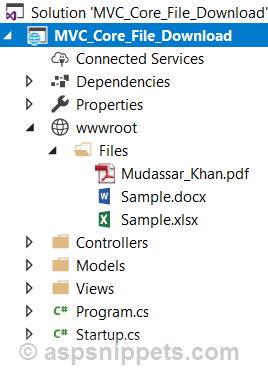
The Folder (Directory) is located within the Project inside the wwwroot folder. Below is the screenshot of the Solution Explorer window where you can see the Folder (Directory) i.e. Files and it containing three files.
Controller
The Controller consists of two Action methods.
Action method for handling File Display operation
Inside this Action method, simply the View is returned.
Action method for handling File Download operation
This action method handles the File Download operation and when the ActionLink is clicked, the name of the File to be downloaded is sent to this method.
First, the File’s path is generated by combining the Directory.GetCurrentDirectory(), wwwroot and the Files folder which contains the Files to be downloaded.
Then the File is read as Binary Data into a Byte Array object using the ReadAllBytes method of the File class.
And then the Byte Array object is sent for download using the File function.
public class HomeController : Controller
{
public IActionResult Index()
{
return View();
}
public IActionResult DownloadFile(string fileName)
{
//Build the File Path.
string path = Path.Combine(Directory.GetCurrentDirectory(),"wwwroot","Files",fileName);
if (System.IO.File.Exists(path))
{
//Read the File data into Byte Array.
byte[]bytes = System.IO.File.ReadAllBytes(path);
//Send the File to Browser.
return File(bytes,"application/octet-stream",fileName);
}
else
{
return NotFound();
}
}
}
View
The HTML Table contains an ActionLink for downloading the File.
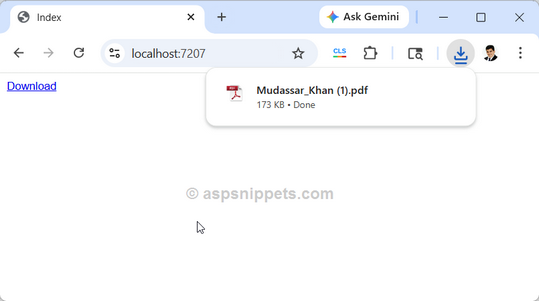
When the Download link is clicked, the ActionLink calls the DownloadFile Action method and the File is downloaded.
@{
Layout = null;
}
<!DOCTYPE html>
<html>
<head>
<meta name="viewport" content="width=device-width" />
<title>Index</title>
<style type="text/css">
body {font-family:Arial;font-size:10pt; }
</style>
</head>
<body>
@Html.ActionLink("Download", "DownloadFile", new {fileName = "Mudassar_Khan.pdf" })
</body>
</html>
Screenshot
Testing Log
Compiled in: Visual Studio 2026
Framework: .Net Core 10.
Result: 100% Success
Downloads
