Ref:
Login page will remain same.
You need to change this C# code to set the Session if user is authenticated successfully.
C#
protected void ValidateUser(object sender, EventArgs e)
{
    int userId = 0;
    string constr = ConfigurationManager.ConnectionStrings["constr"].ConnectionString;
    using (SqlConnection con = new SqlConnection(constr))
    {
        using (SqlCommand cmd = new SqlCommand("Validate_User"))
        {
            cmd.CommandType = CommandType.StoredProcedure;
            cmd.Parameters.AddWithValue("@Username", Login1.UserName);
            cmd.Parameters.AddWithValue("@Password", Login1.Password);
            cmd.Connection = con;
            con.Open();
            userId = Convert.ToInt32(cmd.ExecuteScalar());
            con.Close();
        }
        switch (userId)
        {
            case -1:
                Login1.FailureText = "Username and/or password is incorrect.";
                break;
            case -2:
                Login1.FailureText = "Account has not been activated.";
                break;
            default:
                Session["UserId"] = userId;
                FormsAuthentication.RedirectFromLoginPage(Login1.UserName, Login1.RememberMeSet);
                break;
        }
    }
}
Change Password Page
HTML
<div>
    <table cellpadding="3" border="0">
        <tr>
            <td>
                Old Password:
            </td>
            <td>
                <asp:TextBox ID="txtOldPassword" runat="server" TextMode="Password" />
            </td>
            <td>
                <asp:RequiredFieldValidator ID="OldPasswordRequiredValidator" runat="server" ControlToValidate="txtOldPassword"
                    ForeColor="red" Display="Static" ErrorMessage="Required" />
            </td>
        </tr>
        <tr>
            <td>
                New Password:
            </td>
            <td>
                <asp:TextBox ID="txtPassword" runat="server" TextMode="Password" />
            </td>
            <td>
                <asp:RequiredFieldValidator ID="PasswordRequiredValidator" runat="server" ControlToValidate="txtPassword"
                    ForeColor="red" Display="Static" ErrorMessage="Required" />
            </td>
        </tr>
        <tr>
            <td>
                Confirm Password:
            </td>
            <td>
                <asp:TextBox ID="txtPasswordConfirm" runat="server" TextMode="Password" />
            </td>
            <td>
                <asp:RequiredFieldValidator ID="PasswordConfirmRequiredValidator" runat="server"
                    ControlToValidate="txtPasswordConfirm" ForeColor="red" Display="Static" ErrorMessage="Required" />
                <asp:CompareValidator ID="PasswordConfirmCompareValidator" runat="server" ControlToValidate="txtPasswordConfirm"
                    ForeColor="red" Display="Static" ControlToCompare="txtPassword" ErrorMessage="Confirm password must match password." />
            </td>
        </tr>
        <tr>
            <td>
            </td>
            <td>
                <asp:Button Text="Change Password" OnClick="ChangePassword" runat="server" />
            </td>
        </tr>
    </table>
    <br />
    <asp:Label ID="lblMessage" runat="server" ForeColor="White" />
</div>
Namespaces
using System.Configuration;
using System.Data.SqlClient;
using System.Data;
using System.Drawing;
C#
protected void ChangePassword(object sender, EventArgs e)
{
    int userId = 0;
    if (Session["UserId"] != null)
    {
        int.TryParse(Session["UserId"].ToString(), out userId);
    }
    bool isPasswordChanged = false;
    string constr = ConfigurationManager.ConnectionStrings["constr"].ConnectionString;
    using (SqlConnection con = new SqlConnection(constr))
    {
        using (SqlCommand cmd = new SqlCommand("User_ChangePassword"))
        {
            using (SqlDataAdapter sda = new SqlDataAdapter())
            {
                cmd.CommandType = CommandType.StoredProcedure;
                cmd.Parameters.AddWithValue("@UserId", userId);
                cmd.Parameters.AddWithValue("@OldPassword", txtOldPassword.Text.Trim());
                cmd.Parameters.AddWithValue("@NewPassword", txtPassword.Text.Trim());
                cmd.Connection = con;
                con.Open();
                isPasswordChanged = Convert.ToBoolean(cmd.ExecuteScalar());
                con.Close();
            }
        }
        string message = string.Empty;
        switch (isPasswordChanged)
        {
            case true:
                message = "Password change successfully";
                this.lblMessage.BackColor = Color.Green;
                break;
            case false:
                message = "Old Password does not matched with database.";
                this.lblMessage.BackColor = Color.Red;
                break;
        }
        this.lblMessage.Text = message;
    }
}
SQL
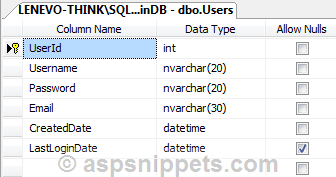
SQL database is available in the above article reference link.
-- User_ChangePassword 9 ,'Test123','Test111'
CREATE PROCEDURE User_ChangePassword
    @UserId INT,
    @OldPassword NVARCHAR(20),
    @NewPassword NVARCHAR(20)
AS
BEGIN
    SET NOCOUNT ON;

    IF EXISTS(SELECT UserId FROM Users WHERE UserId = @UserId AND [Password] = @OldPassword )
    BEGIN
        UPDATE [Users]
        SET [Password] = @NewPassword
        WHERE UserId = @UserId AND [Password] = @OldPassword

        SELECT 'TRUE'
    END
    ELSE
		BEGIN
			SELECT 'FALSE'
		END
END
GO
Screenshot
When old password is wrong

When old password is correct

