In this article I will explain how to download and install Crystal Reports for Visual Studio 2019.
This is an informative article to help people know the download location for Crystal Reports for Visual Studio 2019.
Note: Crystal Report does not work with Visual Studio Express editions.


Steps to download Crystal Report (Developer Edition) for Visual Studio 2019

1. You will need to visit the following Link.
2. Then you will need to click on the Download software now Button.
Download Crystal Reports for Visual Studio 2019
 
3. Once you click on the Button, the following Popup will appear where you need to either register or if you already have an account at SAP then login.
Download Crystal Reports for Visual Studio 2019
 
4. Once the above is done, you will now be allowed to download the Crystal Report for Visual Studio 2019.
Download Crystal Reports for Visual Studio 2019
 
Note: If you are unable to find the above section, then please use this DirectDownLoad link: Download Crystal Report for Visual Studio 2019.
 
Download Crystal Reports for Visual Studio 2019


Installing Crystal Reports for Visual Studio

Right click on the downloaded Crystal Reports for Visual Studio 2019 file and click Open.
Download Crystal Reports for Visual Studio 2019


The WinRAR self-extracting archive file will first extract its contents and then the installation will start.

Download Crystal Reports for Visual Studio 2019
 
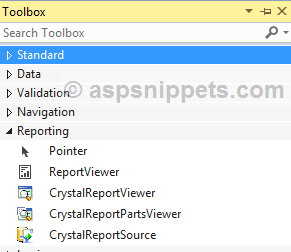
After the installation you will find Crystal Reports in the Toolbox of Visual Studio 2019.
Download Crystal Reports for Visual Studio 2019